

Overview
We’ve all been there — staring at Xcode while the progress bar creeps along, seemingly stuck on “Building module…”. Sometimes it’s right after a tiny code change, yet you’re hit with a full rebuild. As projects grow in size and complexity, these delays become more than an annoyance — they chip away at productivity and developer momentum.
That’s why today we’re diving into a promising new capability introduced in Xcode 16: explicit module builds. This feature allows you to take control of how Swift and Clang modules are compiled, reducing hidden inefficiencies and unlocking smarter parallelism in your builds.
How Module Dependencies Are Built
Before jumping into the new approach, let’s revisit how module compilation has traditionally worked in Xcode — implicitly.
So, what’s a module?
In Xcode, a module refers to any independently compiled unit — a Swift Package, a framework, or even a target. These modules represent isolated compilation contexts, making them distributable but also potential bottlenecks in your build pipeline.
The Swift compiler performs three essential tasks:
- It generates a .swiftinterface file by summarizing public interfaces from your source code.
- It compiles modules into binary .swiftmodule files.
- It resolves import statements by locating the relevant .swiftmodule files.
With implicit module builds, each compiler process discovers and compiles required modules on the fly. This works, but it’s inefficient: if multiple Swift compiler instances require the same module, one may start compiling it while others wait, blocking build lanes and increasing total build time.
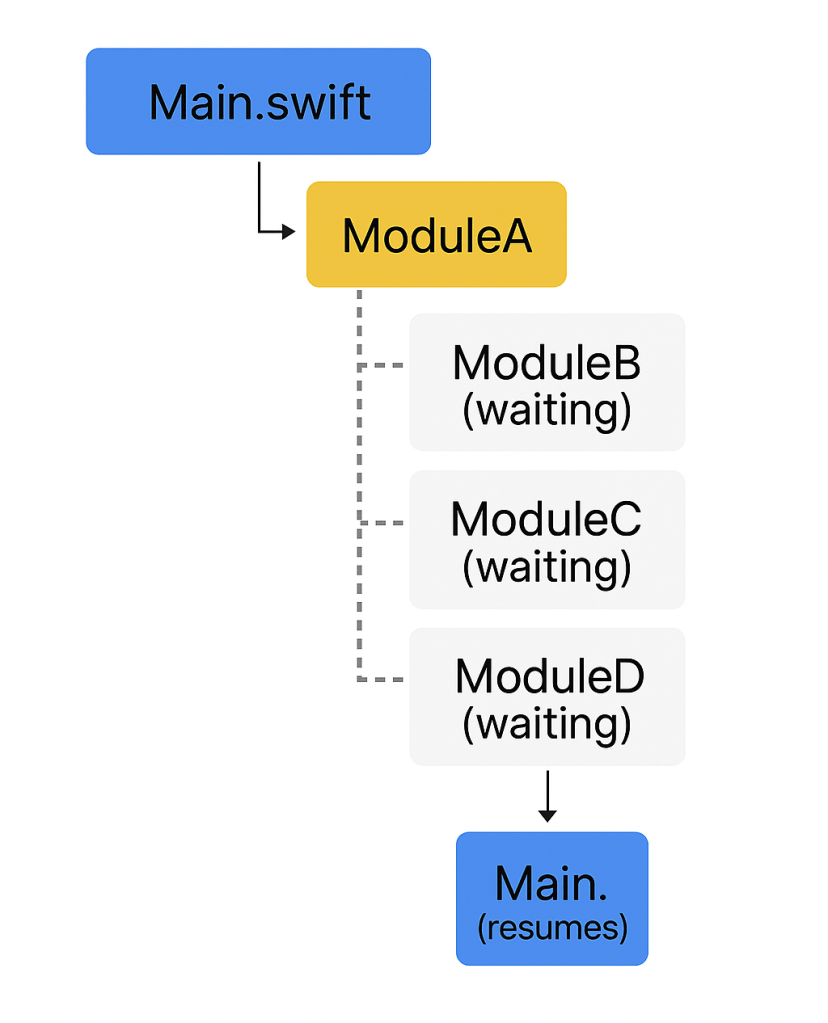
Take this example: an app depends on ModuleA, which in turn depends on ModuleB, C, and D. The implicit approach doesn’t guarantee that B, C, and D are compiled before A, causing CPU threads to idle while waiting on dependent builds.
The New Way: Explicit Module Builds
Xcode 16 introduces a smarter, three-step build strategy:
- Scanning
- Building Modules
- Building Source Code
Step 1: Scanning
Xcode first constructs a module dependency graph — a Directed Acyclic Graph (DAG) — representing which modules depend on which. This makes it easy to identify leaf nodes (modules with no dependencies) and start building those first, maximizing concurrency.
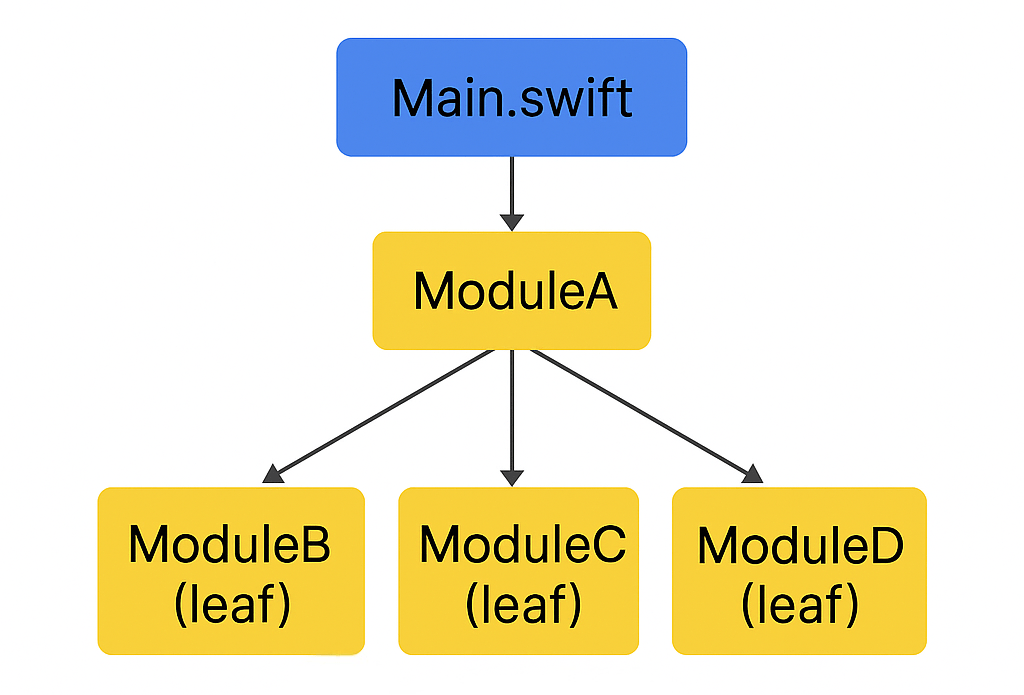
Step 2: Building Modules
With the graph in hand, Xcode can schedule module builds intelligently. Rather than letting compiler processes block each other, the build system now waits for dependencies to be ready before dispatching tasks — keeping execution lanes efficiently utilized.
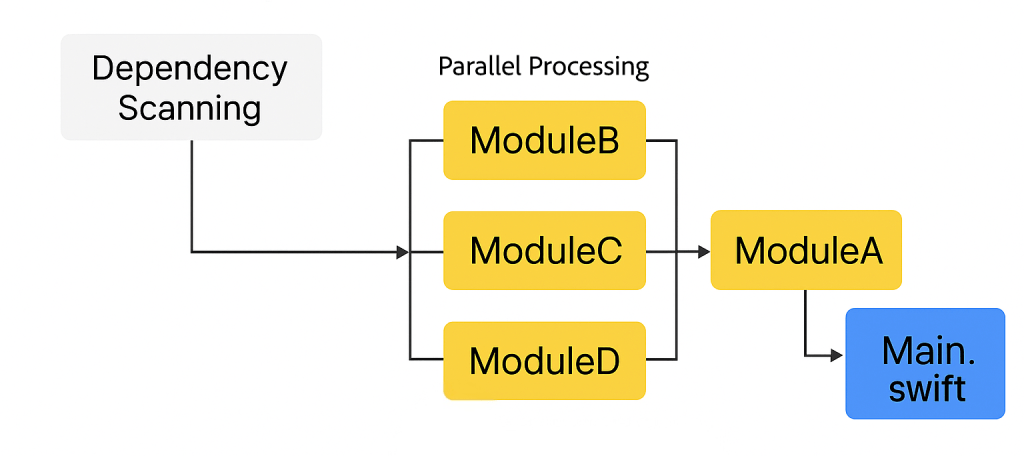
Step 3: Building Source Code
Finally, source files are compiled — but only once all their dependent modules have been explicitly built. This means source builds now skip the overhead of on-the-fly module compilation, reducing build time per file.
In practice, builds become more granular. Implicit builds tend to have fewer, longer-running tasks because module compilation is hidden inside source file compilation. Explicit builds break these out into separate, parallel tasks.
For example, in explicit mode, you might observe that the UIKit is compiled three times across three threads — something not visible in implicit builds. Xcode can now track and deduplicate this work across targets, saving time in large projects.
A real-world timeline appears built implicitly looks more like this:
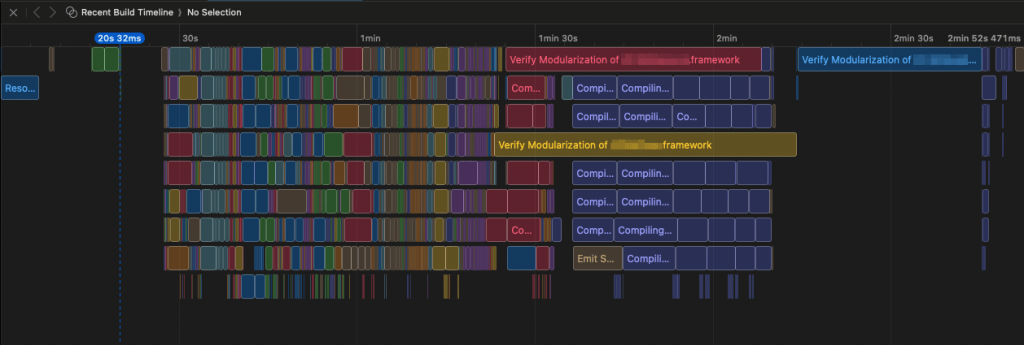
Let’s compare it with a build of the same target, but with explicitly built modules:
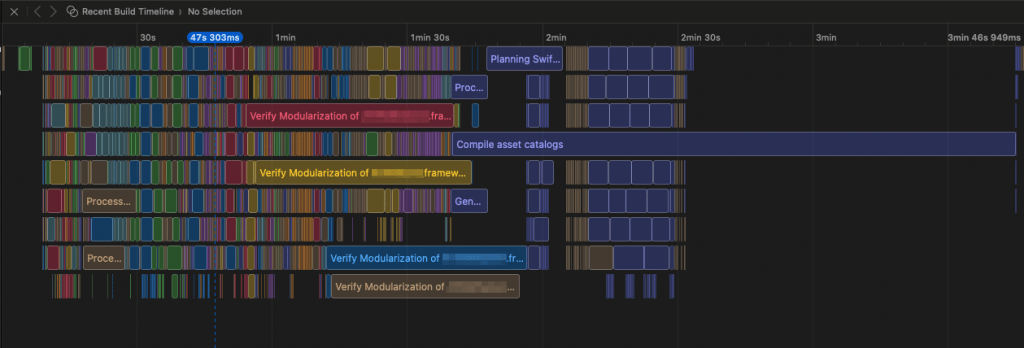
Bonus: Debugger Module Reuse
Another benefit: debugger responsiveness.
With explicit modules, Xcode can pass pre-built modules directly to the debugger, avoiding the need to rebuild them when evaluating expressions like p or po. In implicit builds, the debugger often builds its own modules separately, leading to slow type resolution. This change significantly reduces wait time during debugging.
How to Enable It
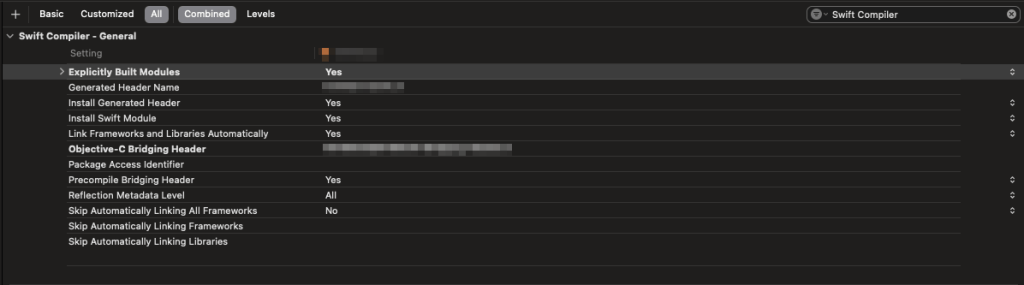
Enabling explicit module builds is simple:
- Go to Build Settings → Swift Compiler (General)
- Set “Explicitly Build Modules” to YES
Under the hood, this adds the following to your build settings:
_EXPERIMENTAL_SWIFT_EXPLICIT_MODULES=YES
Reducing Module Variants
In larger projects, you might encounter module variants — different builds of the same module triggered by diverging compiler flags (e.g. header paths, language versions). These slow down builds.
Xcode now tries to eliminate unneeded variants by deduplicating arguments during the scan phase. Still, you should help it out:
- Unify build settings across targets
- Move common settings (like language version) to the project or workspace level
This enables more reuse and fewer redundant compilations.
Monitoring Builds
You can inspect build performance using:
- Build Timeline (Enable via Report Navigator)
- Clean Build + “Build with Timing Summary”
- Filter the build log for “modules report”
This gives insight into module timings, number of variants, and Clang vs Swift module behaviors.
Performance Benchmarks
Does it actually speed things up? The answer: it depends.
Project #1 – Mid-size App (Swift + Obj-C)
| Scenario | Explicit Modules | Time (s) |
| Clean Build | YES | 183.0 |
| Clean Build | NO | 88.0 |
| Incremental Build | YES | 18.0 |
| Incremental Build | NO | 17.0 |
Takeaway: Clean builds are 107% slower with explicit modules, and incremental builds show negligible differences.
Project #2 – Large App (Swift + Obj-C)
| Scenario | Explicit Modules | Time (s) |
| Clean Build | YES | 215.0 |
| Clean Build | NO | 248.0 |
| Incremental Build | YES | 91.0 |
| Incremental Build | NO | 156.0 |
Takeaway: Explicit modules were 13.3% faster on clean builds and 41.7% faster on incremental builds.
Final Thoughts
In testing across different projects, explicit module builds didn’t always improve performance — but when they did, the gains were significant, especially in projects with deep dependency graphs or many modules.
It’s important to remember:
- This feature is still experimental
- Results may vary depending on project structure
- Some edge cases or regressions may still exist
That said, it’s easy to test and low risk to try. If you want to automate testing across projects, consider scripting builds with different flags and comparing timing summaries.
Conclusion
Explicit module builds introduce real architectural improvements to Xcode’s build system. While not a guaranteed win for every project, the potential benefits for larger codebases are clear. If you’re working on a growing iOS app, this is absolutely worth trying — and watching as the feature matures in future Xcode releases.
 SwiftHive.co
Leave a comment